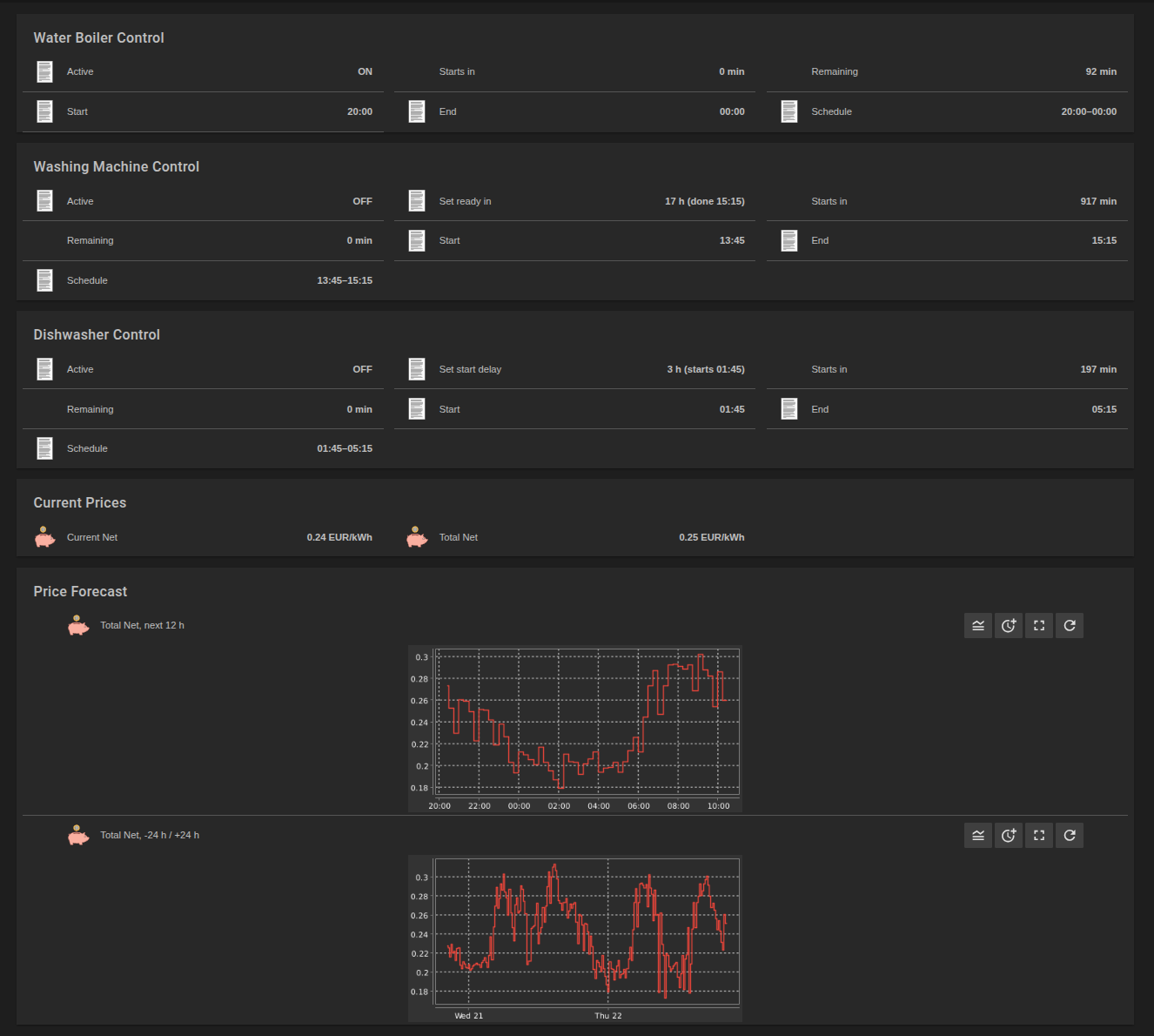
Since 2026, Austrian grid operators charge less for the grid between 10:00 and 16:00 from April to September, the “Sommer-Nieder-Arbeitspreis”, or SNAP. The idea is simple: in summer the grid is full of solar power at noon, so power used at that time should be cheaper, and people should move their consumption there.
My water boiler already moves, it heats in the cheapest 4 hours of the day (how that works). So I added SNAP to the price the boiler looks at and expected a nice saving. It saved 5 cents in a whole summer.
What SNAP is worth
At Wiener Netze the grid fee for a household is 6.98 ct/kWh, and 5.58 ct/kWh in the SNAP hours, both net. With the Vienna usage levy of 7 % and 20 % VAT, the difference is 1.80 ct/kWh.
In my Flux task that builds the price I really pay, SNAP is one row of the fee table and one function:
networkFee = (t, f) => {
    m = date.month(t: t)
    h = date.hour(t: t)

    return if f.hasSnap and m >= f.snapMonthFrom and m <= f.snapMonthTo and h >= f.snapHourFrom and h < f.snapHourTo then f.snap else f.network
}
The task writes this price as a forecast, and the boiler window is calculated from it. So the boiler sees SNAP before it decides.
What it changed
I compared the boiler window with and without SNAP for every day from April to September, in 2026 with the real SNAP, and in 2025 as if it had been there already:
April to September
2025
2026
Cheapest 4 h without SNAP within 10:00 to 16:00
167 of 183 days
174 of 183 days
Days on which SNAP moved the boiler window
15
6
What the moved windows saved
0.24 EUR
0.05 EUR
On 95 % of the days in 2026, the cheapest 4 hours were inside the SNAP hours anyway, without SNAP. On the few days where SNAP moved the window, the cheaper grid fee just tipped a close race.
In the post about heating water I wrote 7 days and 9 cents. That was a first calculation over a whole year with the energy price only. These numbers use the full price I pay, for the SNAP months only. The result is the same.
Why
Because the exchange price already does what SNAP is meant to do. The same solar power that SNAP is about pushes the day-ahead price down at noon. From April to September 2026, the evening between 16:00 and 22:00 was on average 13.7 ct/kWh more expensive than the SNAP hours, even without SNAP. SNAP adds 1.8 ct to a gap of almost 14 ct. A window that already sits at noon does not move for that.
So it does nothing?
Not quite. Everything I draw from the grid in the SNAP hours is cheaper, whether I moved it there or not. From April to September 2026 I drew 1414 kWh from the grid, 874 kWh of it in the SNAP hours, mostly while the boiler was heating. Only those 874 kWh got cheaper, by 1.80 ct each:
April to September
From the grid, all hours
With SNAP
Without SNAP
Difference
2025
1155 kWh
234.12 EUR
246.50 EUR
12.38 EUR
2026
1414 kWh
306.86 EUR
322.57 EUR
15.71 EUR
About 5 % less for the summer half of the year, with 2025 calculated as if SNAP had been there.
But that is a cut in the grid fee, not a reward for moving anything. The boiler was at noon because of the exchange price, and it would be there without SNAP too.
With a fixed price per kWh it is different. Then SNAP is the only reason to run something at noon, and moving the boiler from the night to the SNAP hours saves those 1.8 ct/kWh. With a dynamic tariff, the exchange price got there first.
Since July 2025 I am with AAE Natur.spot, before that I had the hourly tariff of aWATTar. With a dynamic tariff, the price per kWh follows the day-ahead price of the electricity exchange (EPEX Spot), plus a fixed surcharge and VAT. Negative prices are passed through, so there are hours where I get money for using power. The prices for the next day are published around noon, so I always know them until the end of tomorrow.
And the difference is big. The cheapest hours are usually around noon, when solar floods the market, and at night. The most expensive ones are in the early evening. Since 1 October 2025 the European day-ahead market even trades quarter hours instead of hours, so there are 96 prices per day.
Getting the prices into openHAB
openHAB has an aWATTar binding that fetches these prices. There was just one problem. The aWATTar API delivers hourly prices:
So I extended the binding. Energy-Charts by Fraunhofer ISE publishes the day-ahead prices, quarter hours included, through a free API. I added it as a second provider, with a common MarketPriceApi for both, a provider option on the bridge and unit tests for the new parser (pull request).
In the very first week, the Energy-Charts API was down for almost three days (HTTP 503), and no prices for the next day arrived. Switching the bridge back to provider="awattar" kept everything running on hourly prices until it was back. So having two sources paid off immediately.
Asking Google for the price
A small hack I really like. Google Home has no device type for electricity prices, but it has air quality sensors. So a rule rounds the current price to cents
rule "Price level for Google"
when
    System started or Item TotalNet changed
then
    if (TotalNet.state instanceof Number) {
        // EUR/kWh -> ct/kWh, e.g. 0.18 -> 18
        TotalNetCents.postUpdate(Math.round((TotalNet.state as Number).floatValue * 100.0))
    }
end
“Hey Google, what is the CO₂ level?” now answers with the electricity price in cents. The unit is wrong, the number is right, and nobody in the house cares 🙂
The price I really pay
The exchange price is only part of the bill. On top come the grid fee, the grid losses, a few levies, the electricity tax and VAT, about 10 cents per kWh in total. Most of it is the same in every quarter hour, so it does not change which hours are cheapest. With one exception. In Austria the grid fee is lower in summer between 10:00 and 16:00, the “Sommer-Nieder-Arbeitspreis” (SNAP). At my grid operator, Wiener Netze, that is 5.58 instead of 6.98 ct per kWh, net.
So a Flux task builds the price I really pay, from my invoices. The fees are a table, each row valid from its date until the next one:
The result goes to InfluxDB twice. As PricePaid_EURkWh for the dashboards, and as PricePaidForecast, written in the format of openHAB persistence. For openHAB that is simply the forecast of a Number item:
Number PricePaidForecast "Paid price [%.3f EUR/kWh]" <price>
When a new invoice brings new fees, I add a row, and every window from then on uses them.
Heating the water
The boiler hangs on a Shelly Pro 1PM (ad), a relay for the distribution board. Its switch is the item RelayOutput.
The boiler holds about 100 litres at 55 to 60 °C and draws about 2 kW. It needs about 4.7 kWh a day on average, so 4 hours are always enough to heat it fully.
The aWATTar binding has bestprice things that find such a window, but they count the length in price intervals, so 4 hours are length="4" with hourly prices and length="16" with quarter hours, and they only see the prices of that binding. So I wrote an add-on for openHAB that finds the cheapest window in any forecast item (pull request, it gets its own post once it is merged). The boiler gets the cheapest 4 hours between 04:00 and midnight, as a rule in a YAML file:
version: 1
rules:
  optimalwindow:boiler:
    label: Optimal window water boiler
    triggers:
      - id: "1"
        type: optimalwindow.WindowTrigger
        config:
          forecastItem: PricePaidForecast
          rangeStart: "04:00"
          rangeDuration: 20h
          length: 4h
          activeItem: BoilerControlEveningActive
          startItem: BoilerControlEveningStart
          endItem: BoilerControlEveningEnd
    conditions:
      # no ON during holidays, OFF always passes
      - id: "3"
        type: script.ScriptCondition
        config:
          type: application/javascript
          script: |
            !(command.toString() === 'ON' && items.ScenarioTriggered.state === 'Urlaub')
    actions:
      # empty command: ON or OFF from the trigger
      - id: "2"
        type: core.ItemCommandAction
        config:
          itemName: RelayOutput
The trigger fires when the window starts and when it ends, and passes ON or OFF as command. The action sends it to the relay. The condition only blocks the ON while we are on holiday, so a boiler that is heating is always switched off at the end.
On a sunny day the cheapest window is usually around noon. Nice side effect: that is exactly when the balcony PV produces, so the boiler uses energy I would otherwise give away. And in summer the SNAP hours are right there as well.
Washing machine and dishwasher
These two I cannot switch, I have to start them myself. But both have a timer. The washing machine has “ready in” (we use a 1:30 h program), the dishwasher a start delay (3:30 h). So each gets its own window rule, without an action, and a small rule turns the window into the value to set:
val ds = if (DishwasherControlStart.state instanceof DateTimeType) (DishwasherControlStart.state as DateTimeType).getZonedDateTime(ZoneId.systemDefault()) else null
if (ds !== null && ds.isAfter(now)) {
    val h = Math.round(Duration.between(now, ds).toMinutes / 60.0)
    DishwasherDelaySetting.postUpdate(h.toString + " h (starts " + String.format("%1$tH:%1$tM", ds) + ")")
}
The app shows at any time what to set, like “3 h (starts 01:45)”. The dishwasher window runs from 14:00 to 14:00, because the prices for the next day are there from about 13:00. If its window starts at night, a push at 21:00 tells me the delay before I go to bed. For a window by day, there is a push 15 minutes before.
Both machines now also hang on a Bosch compact smart plug (ad). They only measure. A rule pushes when a run is done, with the duration, the energy and what it cost at the paid price, and reminds me when a window by day started without a run.
Does it pay off?
For the boiler I have all quarter hours since January 2025. The old setup simply reheated whenever we took hot water, so mostly in the morning and in the evening, the most expensive time of the day. With the AAE price and the fees of my invoices for the whole time, the controlled boiler cost 21.2 ct/kWh on average. The same energy at the times we use the water, with the standby losses spread over the day, would have cost about 284 EUR more since January 2025. That is about 130 EUR for 2025, and about 215 EUR a year at the rate of 2026, which is higher because of SNAP and because the windows use the paid price.
Two things I expected to help, but they do not:
The boiler does not need one block, it could also heat in the 16 cheapest single quarter hours of the day. Over a year that is an energy price of 7.67 instead of 7.96 ct/kWh, about 5 EUR a year more. On most days the cheap hours are next to each other anyway, but the relay in the Shelly would switch about 580 instead of 365 times a year, on some days up to 9 times, always with 2 kW on it. For 5 EUR I would rather not stress it.
SNAP changed the boiler window on only 7 of 365 days, and the whole year saved 9 cents. The summer midday is already the cheapest time because of all the solar power in the grid, so the window is there anyway. It still counts in the cost, just not in the choice of the window.
So the boiler now runs when power is cheap. But it is still a 2 kW load, and when it runs together with the oven, the house pulls more power than I would like.
Links marked (ad) are Amazon affiliate links. If you buy through them, I get a small commission, the price stays the same for you. As an Amazon Associate I earn from qualifying purchases (Als Amazon-Partner verdiene ich an qualifizierten Verkäufen).
A setup like this is never finished. Since the first posts went online, a few things changed that do not need a post of their own, but would make the old ones wrong if I kept quiet about them.
More data from the inverters
In the post about the balcony PV the DTU thing only had the values I used at first. The DTU sends a lot more. Four more values per inverter are in the thing now: the AC voltage and the efficiency on ch0, and the DC power and the irradiation of the panel on ch1, the module input:
Type number : balkon_so_U_AC          "SO AC voltage"   [ stateTopic="inverter/Balkon_SO/ch0/U_AC", unit="V" ]
Type number : balkon_so_Efficiency    "SO efficiency"   [ stateTopic="inverter/Balkon_SO/ch0/Efficiency", unit="%" ]
Type number : balkon_so_P_DC          "SO DC power"     [ stateTopic="inverter/Balkon_SO/ch1/P_DC", unit="W" ]
Type number : balkon_so_Irradiation   "SO irradiation"  [ stateTopic="inverter/Balkon_SO/ch1/Irradiation", unit="%" ]
Irradiation is the DC power as a share of the peak power of the module. The items get unit="%", otherwise openHAB shows efficiency and irradiation as a plain number, and the same expire as the power.
Both inverters run at about 95 % efficiency. In the morning and the evening, at a few watts, the value jumps to 100 %, because the DTU rounds AC and DC power. In Grafana I only show the efficiency while the DC side delivers at least 20 W.
Saving in the UI still works, but the next deployment of a changed file overwrites it, so I export a change back into git first. A dashboard file I delete in git disappears from Grafana with the next deployment.
Two more Flux tasks, and a fix
There are two more tasks, both for the history panels, which got slow when they calculated everything from the raw data:
Task
Writes
Runs
Boiler hourly
boiler energy per hour, from the counter of its relay
every 15 min
Base load daily
lowest quarter hour between 00:00 and 05:00, per day
every hour
And a fix in “Energy 15m”. The linear interpolation draws a line to the end of the quarter hour. In the running quarter, and at a gap in the data, there is no later point yet, so the line is extrapolated and can go below zero. One quarter hour showed -0.09 kWh of grid import. Now the task clamps the energy at zero:
|> map(fn: (r) => ({r with _value: if r._value > 0.0 then r._value / 1000.0 else 0.0}))
Read-only backups
In the post about Docker Compose the price scraper got a read-only file system. The backup container now gets the same idea. It only reads what it backs up, so those mounts are read-only. Only its own database and the backup target stay writable:
After moving from Portainer to git, every Compose file and every piece of configuration was in git. But a git repository is only a description. Getting it onto the server was still a list of manual steps that I would have to remember after a disk failure. Probably at the worst possible moment, like the last time my RAID died while I was sitting in a bar.
Two repositories
The Compose repository stays as it is and describes what runs. A second repository with Ansible describes how it gets there:
playbooks/
  rebuild_omv.yml          the base: Docker, InfluxDB, users, SSH
  bootstrap_docker.yml
  bootstrap_influxdb.yml   InfluxDB runs as a host service, not in Docker
  install_omv.yml
  deploy_infra.yml         one playbook per stack
  deploy_monitoring.yml
  deploy_openhab.yml
  ...
roles/
  omv_install/             users, groups, sudo, SSH hardening
  omv_deploy_openhab/      openHAB and Mosquitto
  omv_deploy_monitoring/   Prometheus, Grafana, InfluxDB tasks, backups
  ...
inventory/
  group_vars/vault.yml     encrypted secrets (Ansible Vault)
All I need is a freshly installed OpenMediaVault with my user and SSH key. Then the base, and after it one playbook per stack:
-K asks for the sudo password, my user has no passwordless sudo on the server.
What a role does
Take the openHAB role as an example. It runs these steps in order:
Preflight. Check that all required variables and vault values exist, and fail before touching anything.
Create the service users and groups (openhab, mosquitto) and read their IDs for the containers.
Create /srv/openhab/... with the right owners and permissions, and install my own add-ons.
Copy items, things, rules and sitemaps from the Compose repository, and render the files that contain credentials.
Write the .env file of the stack from role variables and vault values, with mode 0600.
docker compose up -d with the file from the Compose repository.
Check that the containers are actually running.
Every service runs as its own user, so the role does not hardcode IDs. It creates the user if needed, reads its UID and GID from the server and writes them into the .env file as PUID and PGID.
Secrets
All passwords and tokens live in a single file encrypted with Ansible Vault. Some openHAB things need credentials right inside their config file, like a device token or a bridge password. Those files are Jinja templates in the Compose repository:
The role renders them during the deployment. If one of the values is missing, the preflight step stops right away. Better than a thing that silently fails to connect.
Safe by default
Every playbook runs read-only, unless I pass -e allow_modifications=true. Together with Ansible’s --check mode, I can always see what would change before anything does:
openHAB picks up the changed file within seconds, and that is the whole deployment. The Flux tasks work the same way. The monitoring role reads the .flux files from git and creates or updates the InfluxDB tasks by name. And so do the Grafana dashboards. They are JSON files in the Compose repository now, the role copies them to Grafana’s provisioning folder and removes the ones I deleted in git.
Fast enough on a small CPU
The server has a Celeron J1900, on an ASRock Q1900-ITX from 2014. Today I would take an ASRock B860I WiFi (ad) with a Core Ultra 5 225 (ad), a lot more power, and still efficient at idle. The first version of the openHAB role copied every config file with its own task, and the deployment took a while. With the timing callback on, every Ansible module call took about 0.9 seconds. Not on the server, the server needs a fraction of that, but on my side, packing and sending the module. 35 config files meant 35 of those calls.
It only reports a change when a file really differs, so a deployment without changes stays quiet. One thing to keep in mind: it adds and updates files, but never deletes one on the server. When I rename a rule file, I remove the old one by hand.
Things that were still in the OpenMediaVault UI
A rebuild only brings back what Ansible knows about. The weekly InfluxDB backup was a scheduled job in the OpenMediaVault UI, so it existed only in the OMV configuration of that very server. Now it is a systemd timer from the monitoring role:
Persistent=true catches up a run that was missed while the server was off. Next to it, a small script checks every hour that the newest backup set is complete (every file from the manifest there, with the right size) and writes the result for the node exporter. Grafana alerts me via openHAB when the backup is older than 8 days or incomplete.
Guard rails
The Ansible repository gets the same checks as the Compose repository. pre-commit runs TruffleHog, ansible-lint and a check that every vault.yml is really encrypted, and GitHub Actions runs the lint again. One small problem: the playbooks load the vault, but CI must never get the vault password. So for the syntax check, CI simply copies the example vault (all values CHANGE_ME) over the real one:
- name: Use example vault
  run: cp inventory/group_vars/vault.example.yml inventory/group_vars/vault.yml
- name: Lint Ansible source
  run: ansible-lint roles playbooks requirements.yml
And we are done. A handful of commands for the whole server, and one command for every small change. Next up is what all of this was built for: heating the water when electricity is cheap.
Links marked (ad) are Amazon affiliate links. If you buy through them, I get a small commission, the price stays the same for you. As an Amazon Associate I earn from qualifying purchases (Als Amazon-Partner verdiene ich an qualifizierten Verkäufen).
openHAB, Mosquitto and Grafana run as Docker containers on my OpenMediaVault server, next to a few other services (reverse proxy, VPN, file sync, backups). For a long time they were stacks in Portainer. Paste a Compose file into a text box, press deploy, forget about it.
The problem with clicking
Portainer works fine. Until you need to answer one of these questions:
What did I change last month, when things started to break?
Which version of the openHAB config belongs to which Compose file?
The disk died. How exactly was this set up?
The Compose files only existed inside Portainer’s database, and the openHAB configuration only in a directory on the server. No history at all.
Step 1: get the Compose files out
Boring, but done in an afternoon. Open every stack in Portainer, copy the Compose file, commit it to a git repository. One directory per stack:
Then everything around the containers followed: the openHAB items, things, rules and sitemaps, the Prometheus config, the Flux tasks, the SWAG proxy configs. If it is text and I wrote it, it goes into git.
Step 2: no secrets in the files
Copied from Portainer, the Compose files were full of passwords, user IDs and paths. Everything secret or specific to the host became a variable:
The values live in a .env file next to the Compose file on the server, and .env is in .gitignore. Every service also runs as its own user (PUID_OPENHAB, …) and owns only its own directories under /srv.
A container that fetches pages from the internet gets a bit more. My price scraper, for example, has its own network, a read-only file system and no Linux capabilities at all:
If someone ever gets code into it, there is not much to do in there.
Step 3: let the machine check it
A repository with configuration for things that have passwords needs some guard rails. Before every commit, pre-commit runs TruffleHog to look for secrets, plus the usual whitespace and YAML checks. And on every push, GitHub Actions validates the whole thing:
docker compose config for every stack, so a broken Compose file never reaches the server
promtool check config for Prometheus
the Grafana dashboard exports must be valid JSON
TruffleHog over the full git history
- name: Validate compose files
  run: |
    for f in stacks/*/docker-compose.yml
    do
      docker compose -f "$f" config -q --no-interpolate
    done
--no-interpolate is important here. CI has no .env files, and it does not need them to check the structure.
A check that checked nothing
My first CI workflow simply ran all pre-commit hooks, TruffleHog included. Green on every run. Great! Until I looked at how the hook is called:
trufflehog git file://. --since-commit HEAD --results=verified --fail
--since-commit HEAD means “scan what changed since the last commit”. On my machine, during a commit, that is exactly the new change. In CI everything is already committed, so it scanned nothing and passed every single time.
Now CI skips that hook and scans the full history instead:
- name: Scan history for secrets
  run: >-
    docker run --rm -v "$PWD:/repo:ro" trufflesecurity/trufflehog:3.90.5
    git file:///repo --results=verified,unknown --fail --no-update
- name: Run pre-commit hooks
  env:
    SKIP: trufflehog
  run: pre-commit run --all-files
The history was clean, luckily. Lesson learned: only trust a check you have seen fail at least once.
Updates
Most images use :latest, and Watchtower takes care of updates in two ways. Containers I trust to update on their own (Mosquitto, for example) carry an opt-in label, and Watchtower updates them once a week, on Sunday at 04:00. A second Watchtower instance only watches the rest, openHAB among them, and reports new versions.
Why weekly? Checking 16 containers within a few seconds every night regularly got single requests rejected by the registry with toomanyrequests, and that container was then skipped until the next run.
And one thing I learned the hard way. “Monitor only” does not mean “nothing changes”. To report a new image, the watching instance downloads it, so the local openhab/openhab:latest already pointed to the new version. The next time I deployed a completely unrelated rule change, Compose noticed that the running container no longer matched its image and recreated it. openHAB went from 5.2.1 to 5.2.2 in the middle of the evening, and its first start got stuck. For twelve minutes every rule failed, until a simple docker restart openhab fixed it. With :latest, any deployment can be an upgrade.
The other way round is just as surprising. Without a watching Watchtower, a deployment never pulls a newer :latest by itself, it only pulls images that are missing. For my own scraper I want every release right away, so it gets pull_policy: always.
What was still missing
Now everything was described in git. But getting it onto the server was still manual work: copy files, create directories with the right owners, write the .env files, docker compose up -d. And a fresh server would need users, groups and permissions that only existed in my head.
The balcony PV system gave me two numbers: what the panels produce and what flows through the grid meter. Next, I wanted both in one place, stored and drawn as nice graphs.
The setup
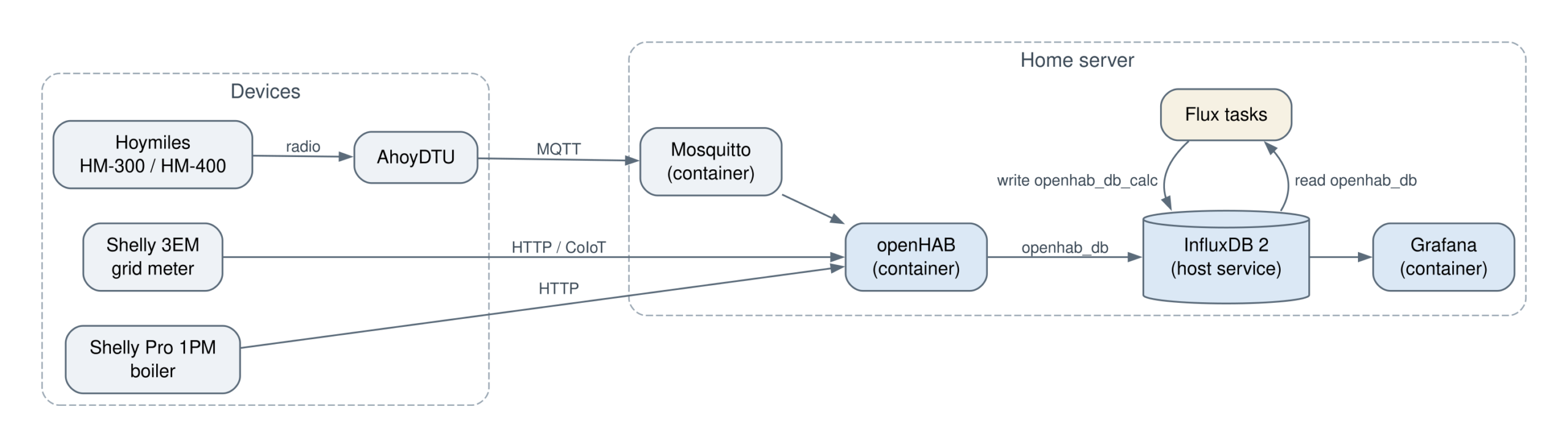
Three containers and one service run on my home server:
openHAB talks to all devices and runs the rules.
Mosquitto is the MQTT broker, mainly for the AhoyDTU.
InfluxDB 2 stores every value. It runs directly on the host, not in a container.
Grafana draws the graphs.
openHAB
I keep the whole openHAB configuration in text files and not in the UI. That way I can diff it, review it and put it into git.
It was not always like that. Like most people, I first clicked the MQTT broker and the Shellys together in the UI. That way they only exist in openHAB’s database: not in git, without history, and gone if the server ever has to be set up again. So I moved them into files. The steps are at the end of this section.
The Shellys have their own binding: one thing per device, addressed by its host name, so a new IP address from the router does not break anything:
Back to the broker and the Shellys I had created in the UI. openHAB keeps everything created in the UI in its own database (userdata/jsondb). The files in conf/ are a second source. A thing can only come from one of them, and two things with the same ID clash. So the order matters:
Copy the thing’s ID, the UID (for example mqtt:broker:OMV-Broker), and use exactly this UID in the file. The items are linked to the UID, so they keep working.
Delete the thing in the UI.
Only then save the file, or change it once more. openHAB only reloads a file when its content changes. Touching it is not enough.
Check that the thing is ONLINE. My MQTT things were stuck in HANDLER_MISSING_ERROR until I restarted openHAB.
Items behave differently. If an item exists both in the UI and in a file, the file wins. But the UI copy stays in the database, and the UI no longer lets you delete it. The API Explorer in the developer tools can, with DELETE /items/{name}.
InfluxDB
openHAB writes every update of these items into the InfluxDB bucket openhab_db. That is the raw data. The grid power, for example, arrives every 10 seconds. The connection is configured in services/influxdb.cfg:
url = https://influxdb.example.org
version = V2
token = ...
# org
db = home
# bucket
retentionPolicy = openhab_db
Yes, the bucket goes into retentionPolicy and the org into db. openHAB keeps the parameter names from InfluxDB 1, even for version 2.
What gets stored is defined in persistence/influxdb.persist:
Every item is stored on every update, and the power items in gPersistence additionally once a minute, so a graph has no gaps when a value does not change.
One trap when I moved the token into the file: openHAB stores UI settings in userdata/config/*.config, and there every = in the token is written as \=. I copied it as it was, and for 28 minutes nothing was stored. So after any change here, check that new points actually arrive.
But raw data is not what I want to look at. Answering “How much did I import yesterday?” means integrating a power curve, and doing that in every Grafana panel is slow and easy to get wrong. So a few Flux tasks inside InfluxDB calculate the derived values and write them into a second bucket, openhab_db_calc:
Task
Writes
Runs
Grid energy hourly
import and export kWh per hour
every 5 min
PV energy hourly
PV kWh per hour, from the inverters’ daily counters
every 5 min
Energy 15m
grid import/export and PV kWh per quarter hour
every 5 min
PV yield daily
kWh per inverter and day
every few min
Energy balance daily
import, export, PV, self-used PV, consumption per day
every 15 min
Grid power 15-min average
the quarter-hour average, as the smart meter sees it
every minute
Two rules made this reliable:
Every task recalculates yesterday and today. Late or missing values get fixed with the next run.
Every value is stamped with the start of its interval.
And since everything comes from the raw data, the second bucket can be deleted and rebuilt at any time.
An example: the hourly PV energy. The inverters report a “yield today” counter that starts at zero every morning, so the energy per hour is simply how much that counter increased:
from(bucket: "openhab_db")
    |> range(start: date.sub(d: 1d, from: today), stop: now())
    |> filter(fn: (r) => r._measurement == "HM300_ch0_YieldToday" or r._measurement == "HM400_ch0_YieldToday")
    |> aggregateWindow(every: 1h, fn: max, createEmpty: false, timeSrc: "_start")
    |> window(every: 1d)
    |> duplicate(column: "_value", as: "total")
    |> difference(keepFirst: true)
    // first hour of the day, or a counter reset: count the hour in full
    |> map(fn: (r) => ({r with _value: if not exists r._value or r._value < 0.0 then r.total else r._value}))
    |> window(every: inf)
    |> group(columns: ["_time"])
    |> sum()   // both inverters
    // ... rename to PvEnergyHourly_kWh and write to openhab_db_calc
A nice side effect of the counter: a gap in the readings only moves energy into the next hour. Nothing gets lost, and the hours always add up to the daily yield.
The grid side has no such counter, only the power, and that is one value for both directions: positive while importing, negative while exporting. Energy is the integral of power over time. So the power is first split into import and export, and each is then integrated per quarter hour:
power =
    from(bucket: "openhab_db")
        |> range(start: start, stop: now())
        |> filter(fn: (r) => r._measurement == "DeviceAccumulatedWatts" and r._field == "value")

quarterly = (tables=<-, name) =>
    tables
        |> aggregateWindow(
            every: 15m,
            fn: (column, tables=<-) => tables |> integral(unit: 1h, interpolate: "linear"),
            createEmpty: false,
            timeSrc: "_start",
        )
        |> map(fn: (r) => ({r with _value: r._value / 1000.0, _measurement: name}))   // Wh to kWh
        |> to(bucket: "openhab_db_calc")

power
    |> map(fn: (r) => ({r with _value: if r._value > 0.0 then r._value else 0.0}))
    |> quarterly(name: "GridEnergy15m_Import_kWh")

power
    |> map(fn: (r) => ({r with _value: if r._value < 0.0 then -r._value else 0.0}))
    |> quarterly(name: "GridEnergy15m_Export_kWh")
interpolate: "linear" is the important part. Without it, integral() only sees the points inside each window, and the time between the last value of one quarter hour and the first of the next is lost. That cost about 0.8 % of the energy per day.
The same trap exists for a simple average. The Shelly reports every few seconds, but not at even intervals, and mean() gives every value the same weight, no matter how long it was valid. timeWeightedAvg() weights each value by how long it was valid, like a meter does:
The last example is a join. I want to know how much of my PV I used myself. For each hour, that is the PV production minus what went into the grid. The two values come from different series, so they have to be joined. That works because both are stamped with the start of the hour:
The house’s consumption is then import plus self-used PV. That is how the daily balance is built, and it is also why every task stamps its values with the start of the interval: otherwise the timestamps would not match.
Time zones
InfluxDB stores everything in UTC, and that is fine. Grafana shows it in local time anyway. The only place where I have to think about it is daily totals, because there I decide where a day ends:
Hourly values are no problem. Grafana groups them into local days or months.
The daily energy balance is cut at midnight in Vienna (option location = timezone.location(name: "Europe/Vienna")). A UTC day would end at 01:00 or 02:00 local time, and the night consumption would land in the wrong day.
The daily PV yield uses UTC days. That works because there is no sun between 22:00 and 02:00 UTC 🙂
I found out how easily this goes wrong while writing this post. An old task from my early days wrote the daily export as a running total, and aggregateWindow stamps its values at the end of the window. So each day’s total carried the timestamp 00:00 of the next day. A Grafana panel took the biggest value per day and summed them up, so every sunny day was counted twice. It showed 537 kWh of export since 2024, the correct number is 470 kWh. No way! The task is deleted now, and all newer ones stamp at the start.
Grafana
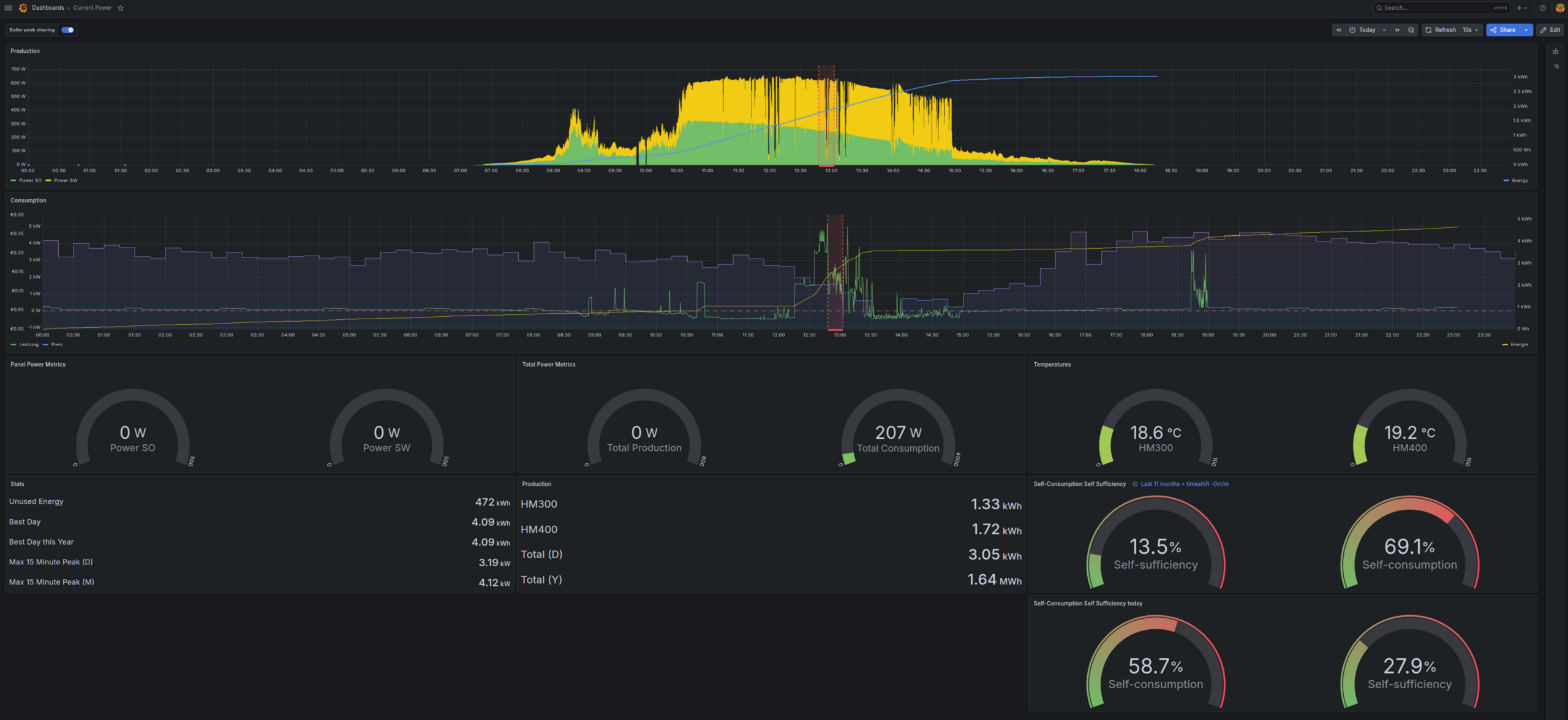
The dashboard I look at most is “Current Power”:
the production of both inverters and the yield of the day
the consumption and the energy of the day
gauges for the current power and the inverter temperatures
the highest quarter hour of the day and of the month
self-consumption and self-sufficiency, for today and for the last months, calculated in the panel from the daily values, so they are right for any time range
The red band around one o’clock is an annotation. Grafana can mark time ranges on top of the graphs, and the data for that can come from a query. Here it is the switch item BoilerPeakShed, which openHAB turns on for the few minutes it keeps the boiler off so the house draws less from the grid. Why and when that happens gets its own post later in this series. Here it is only about the query, which turns every on and off into one range:
from(bucket: "openhab_db")
    |> range(start: v.timeRangeStart, stop: v.timeRangeStop)
    |> filter(fn: (r) => r._measurement == "BoilerPeakShed" and r._field == "value")
    |> difference(keepFirst: true)    // +1 when it turns on, -1 when it turns off
    |> filter(fn: (r) => not exists r._value or r._value != 0)
    |> elapsed(unit: 1s)              // seconds since the previous change
    |> filter(fn: (r) => r._value == -1)
    |> map(fn: (r) => ({
        _time: date.sub(d: duration(v: r.elapsed * 1000000000), from: r._time),
        timeEnd: r._time,
        text: "Boiler shed: " + string(v: r.elapsed) + " s",
    }))
Every “off” row knows how long ago the “on” was, so start and end of the range come from one row. The toggle “Boiler peak shaving” at the top left of the dashboard switches the bands on and off.
I build the dashboards themselves in the UI, that is what Grafana is good at. The data sources come from a file in provisioning/datasources/, again with a read-only token of its own:
Two small solar inverters on the balcony, and one question: how much of this do we actually use?
The inverters
Nothing special here. I bought two Hoymiles micro inverters (HM-300 (ad) and HM-400 (ad), 700 W together), simply because they were cheap. The interesting part is getting the numbers out of them. Locally, every few seconds, and without the manufacturer’s cloud.
For Hoymiles I use AhoyDTU, an open-source firmware for an ESP microcontroller (ad) with a cheap radio module (ad) that talks to the inverters directly. Power, voltage, current, temperature and the yield per inverter end up on MQTT. OpenDTU is an alternative that does the same job.
Different inverters? Then neither of them will help you, but there are other ways:
Many inverters have a local interface, like Modbus TCP or a small HTTP API.
A smart plug with power metering between inverter and socket works with every balcony inverter. You lose the details per panel, but you still get the power and the energy per day. And that is what counts.
The AhoyDTU settings
In the web UI of the DTU, under the MQTT settings, it only needs a few values:
Broker: the IP of the home server (192.168.1.x), port 1883
Topic: inverter
And a name per inverter. Mine are called Balkon_SO and Balkon_SW.
After that the DTU publishes everything below inverter/, one subtopic per inverter and channel, plus inverter/total for both together.
The MQTT broker
The broker is a plain Mosquitto container on the home server:
host="mosquitto" works because openHAB and Mosquitto run in the same Docker network.
For the inverters I could let openHAB pick up the Home Assistant discovery of the DTU. That works, but the things then only exist in the openHAB database, and I want everything in files. So the DTU gets one plain MQTT thing, with one channel per value I actually use:
Thing mqtt:topic:OMV-Broker:ahoy "Ahoy DTU" (mqtt:broker:OMV-Broker) {
    Channels:
        Type number : balkon_sw_P_AC       "SW AC power"     [ stateTopic="inverter/Balkon_SW/ch0/P_AC", unit="W" ]
        Type number : balkon_sw_YieldDay   "SW yield today"  [ stateTopic="inverter/Balkon_SW/ch0/YieldDay", unit="Wh" ]
        Type number : balkon_sw_YieldTotal "SW yield total"  [ stateTopic="inverter/Balkon_SW/ch0/YieldTotal", unit="kWh" ]
        Type number : total_P_AC           "Total AC power"  [ stateTopic="inverter/total/P_AC", unit="W" ]
        // ... the same for Balkon_SO, plus temperature, frequency, DC voltage and current
}
The unit is important. The DTU sends the yield of today in Wh and the total in kWh, and openHAB converts both into the unit of the item. The items link to those channels:
expire sets the power to UNDEF when no new value arrives for 95 seconds. At night the inverters are off and the DTU stops sending, so the power is not stuck at the last value of the evening.
Is the DTU still alive?
A DTU that silently stops working means days without data, and I only notice when I look at the graphs. So I want a push notification instead.
The trick is a feature of MQTT itself, the last will. When the DTU connects to the broker, it publishes connected on the topic inverter/mqtt and leaves a second message with the broker: not connected, its last will. If the DTU disappears without saying goodbye (power gone, WiFi gone), the broker notices after a short timeout and publishes the last will in its name. Both messages are retained, so anyone who subscribes later still gets the current state.
And a rule waits five minutes before it raises the alarm, so a short WiFi hiccup does not wake anybody. The push notification goes through the openHAB app. Simplified, it looks like this:
rule "Ahoy DTU offline alarm"
when
    Item InverterAhoyConnection changed
then
    if (InverterAhoyConnection.state.toString != "connected") {
        ahoyOfflineTimer = createTimer(now.plusMinutes(5), [ |
            if (InverterAhoyConnection.state.toString != "connected") {
                sendBroadcastNotification("Ahoy DTU offline: no MQTT connection for 5 minutes", "error", "ahoy")
            }
        ])
    } else {
        ahoyOfflineTimer?.cancel
        // the real rule also sends "Ahoy DTU is back online" after an alarm
    }
end
Of course I had to test it, so I unplugged the DTU:
23:06:30  InverterAhoyConnection  connected -> not connected   (last will)
23:11:30  InverterAhoyOffline     OFF -> ON                    (alarm, push notification)
23:12:42  InverterAhoyConnection  not connected -> connected   (plugged in again)
23:12:42  InverterAhoyOffline     ON -> OFF                    ("back online" notification)
Works. Why not simply raise an alarm when the inverters stop sending? Because they do that every evening. No sun, no inverter. The DTU stays connected all night, so it is the better signal.
The other side: the grid
The panels are only half of the story. To know how much of their energy the house uses, I need the grid side too. A Shelly 3EM (ad) in the distribution board measures the net power over all three phases. Positive means import, negative means export.
openHAB has a binding for Shellys. The thing needs the IP and, if the Shelly has a login, user and password:
eventsCoIoT makes the Shelly push its values instead of waiting to be polled, so I get a new value about every 15 seconds. The item for the grid power:
Number:Power DeviceAccumulatedWatts "Grid power (net)" (gPersistence) { channel="shelly:shellyem3:0ad35fbad3:device#accumulatedPower" }
gPersistence is a group for all items that are stored at least once a minute, the grid power is one of them.
With these two values I get everything else:
Export: what went back to the grid
Self-used PV: production minus export (per hour, never below zero)
Consumption: grid import plus self-used PV
The numbers
From 1 January to 7 October 2026:
kWh
PV production
663
used in the house
459
exported
209
house consumption
2,885
grid import
2,426
So about two thirds (69%) of the solar energy is used in the house, and the 700 W cover 16% of our consumption. Not much, but not nothing either. The best day so far was 8 April 2026 with 4.1 kWh, and since September 2023 the two inverters have produced 1,631 kWh in total.
What bugs me are the 209 kWh of export. I get no feed-in compensation, so this energy is simply given away. That is 0.75 kWh per day on average, and a lot more on sunny summer days. Every kWh I use myself saves the full electricity price.
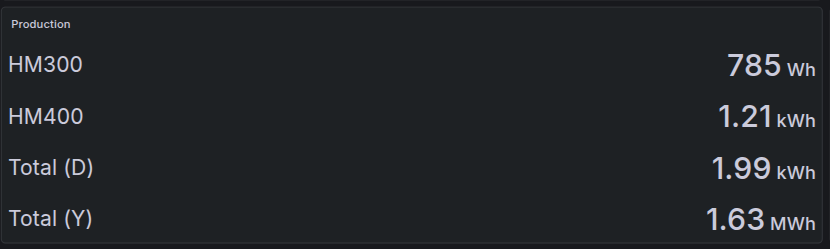
Here is 8 October in Grafana:
Total (D) is today, both inverters together. Total (Y) is not the year, it is everything since the start, the 1,631 kWh from above.
Links marked (ad) are Amazon affiliate links. If you buy through them, I get a small commission, the price stays the same for you. As an Amazon Associate I earn from qualifying purchases (Als Amazon-Partner verdiene ich an qualifizierten Verkäufen).
After creation of the header, the container can be encrypted.
cryptsetup open /dev/sdX <name>
The name can be chosen arbitrary for now. The service will create a block device on /dev/mapper/<name>. After that the file system can be created.
mkfs.ext3 /dev/mapper/<name>
Note: The filesystem can be chosen freely.
Mount as Home Partition.
⚠️ At least one password of the above created container needs to match the password of the user that should login. If no password matches, the container cannot be unlocked!
Copy Content of Current Come Folder.
In order to mount the encrypted container as a home partition of a user, first the current data has to be copied:
Note: In order to lock a container use cryptsetup close <name>.
Note: After the successful installation of the mounting process, delete /home/<user> via an admin account.
Automatically Mount the Container.
First the package libpam-mount-bin needs to be installed, enabling PAM to mount at login or other authentication actions.
sudo apt-get install libpam-mount-bin
Installing libpam-mount-bin creates a default configuration at /etc/security/pam_mount.conf.xml. Adding the following snipped after <!– Volume definitions –> will instruct PAM to unlock the given ‘path‘ with the user password from login and mount it to ‘mountpoint‘.
To get the uuid, use ls and chose the device that was encrypted with the cryptsetup command from above.
ls /dev/disk/by-uuid/ -la
Notes
Swap
The Kernel might write data to the swap partition during system runtime. This data might not get erased and could be recoverable after shutdown or crash of the system.
During hibernation the password for the opened container will be written in plain text to disk. Therefore consider disabling hibernation or encrypt swap as well.
Note: Disabling swap completely on systems with more than 8 GB RAM can be considered safe.
TEMP Folder (/var/tmp)
The TEMP folder contains data that programs have usually currently in use. If a program opens data from the encrypted partition, the program can potentially have parts of the date stored to /var/tmp during execution. Intentionally or unintentionally this data can persist in /var/tmp after termination or a crash.
Usually the /var/tmp folder can be moved safely to RAM or can even be encrypted as well.
Note: Moving /var/tmp to RAM is commonly used by distributions and on single board computer and can be considered safe.
Note: Moving /var/tmp to RAM will cause a full data loss of temporary data during power failure or reboot.
Locate
Locate is a commonly used tool to quickly locate files in the file system. In order for this quick lookup, a database of the files is created and maintained.
Crawling and indexing the encrypted container during system run-time can pose a security risk. Consider therefor disabling crawling of the mounted container with correct configuration of /etc/updatedb.conf.
The command creates a private RSA key with 4192 bits and embeds the public key into the certificate. To supply an
already generated key, the -key option can be used. To create a new key, refer to Section Generation of a Password Protected Private RSA
Key,
To verify the correctness, the x509 sub-command can be used [6]:
The option -aes256 instructs OpenSSL to use symmetric encryption with AES256. The command will ask for a
pass phrase within the shell.
Pass Phrase Removal
To remove the pass phrase, simply pass the key though the rsa sub-command [10]. The command will ask for the phrase
and pipe the unencrypted key into the file specified with the -out option.
I was recently confronted with the “problem” that I wanted to add a reminder for me on every last day in the month.
Google Calendar does not have such an option, but Google Tasks has! So just add a reoccurring task, that will then automatically show up in you calendar.